Get your space
and your Windows back.
Rain Cleaner finds what is filling your drive, keeps your drivers current, and frees up resources while you play. Before anything is deleted, it shows you what it found and why it can go.
NewYour phone can bring Windows back.Rain Recovery Link → Rain Cleaner for AndroidNow available on Google Play →
- Windows 10 and 11
- No subscription
- No ads
Found on this PC
Every line says what it is and why it can go.
- Old update filesLeft behind after a Windows update. Removing them will not roll anything back.4.2 GB
- Temporary filesPrograms write them while they work, then forget them.1.8 GB
- Recycle BinFiles you have already deleted once.760 MB
- Browser cacheIt will fill up again. Sites open once more slowly, then as before.312 MB
In short: Rain Cleaner is a free Windows 10 and 11 program that shows what is filling your drive and explains every item before anything is deleted. It also checks your drivers. Free has no time limit, no ads and no account; Pro, from €5.99 a month, installs all drivers at once and can be tried free for 7 days.
Fix, speed up, update and undo — one click each, and the disk cleans itself when it runs low.
- Free, no subscription
- Runs alongside Windows Defender
- For Windows 10 and 11
A cleaner that explains itself first.
Most tools give you one big button and a number. This one gives you a list you can actually read.
You know what is going
Every finding comes with its size and a line saying why it is there. The checkboxes are yours — clear any you want to keep.
There is a way back
When a driver is updated, the old one is kept. If something misbehaves, you are back in seconds.
Games feel the difference
Game mode frees memory and silences interruptions, then puts every setting back the moment you finish.
Six tools in one program.
Each does one job and tells you what it did.
Cleaning
Frees gigabytes of files that are no longer doing anyone any good.
Drivers
Taken from Microsoft's own catalogue. If the manufacturer has a newer one, it says so.
Game mode
Hands the game the resources the background was quietly holding.
Emergency drivers
Gets a PC with no internet back online, so it can fetch the rest itself.
File protection
Catches the early signs of encryption and stops the program before the damage grows.
Internet
Measures which DNS answers fastest from your connection and offers you that one.
The program itself
Eight of the fourteen screens. The screenshots are real — the numbers come from the machine they were taken on.
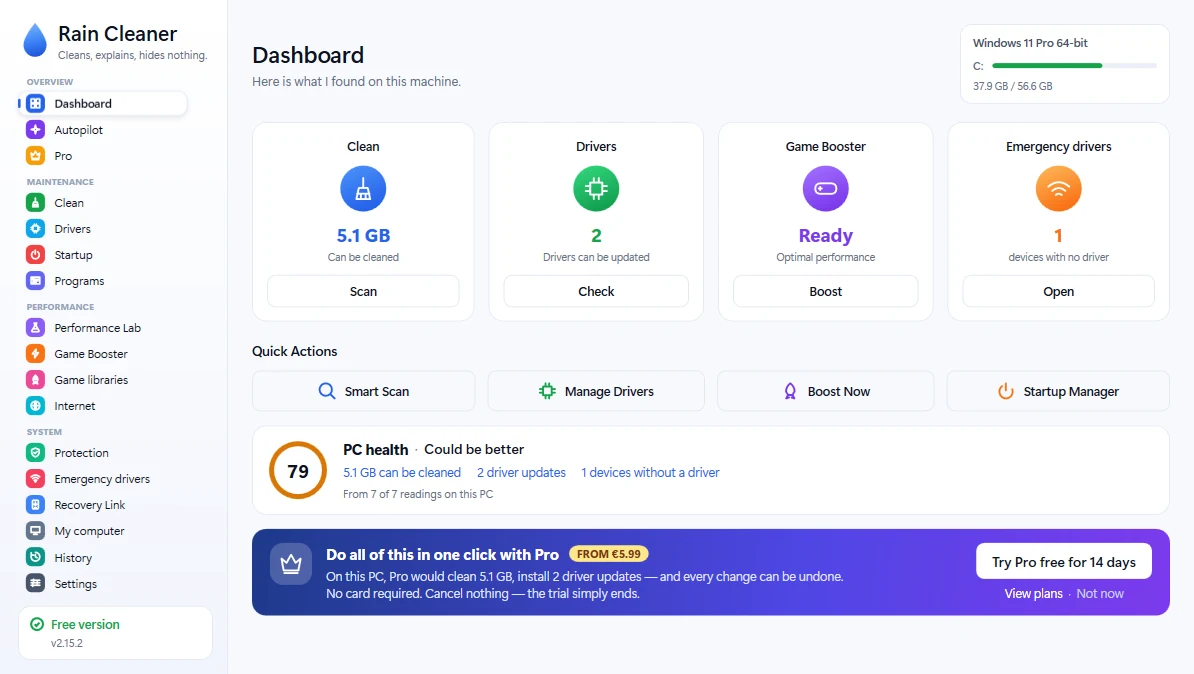
DashboardWhat was found: how much space can be freed, how many drivers are waiting, whether the machine is ready for a game. 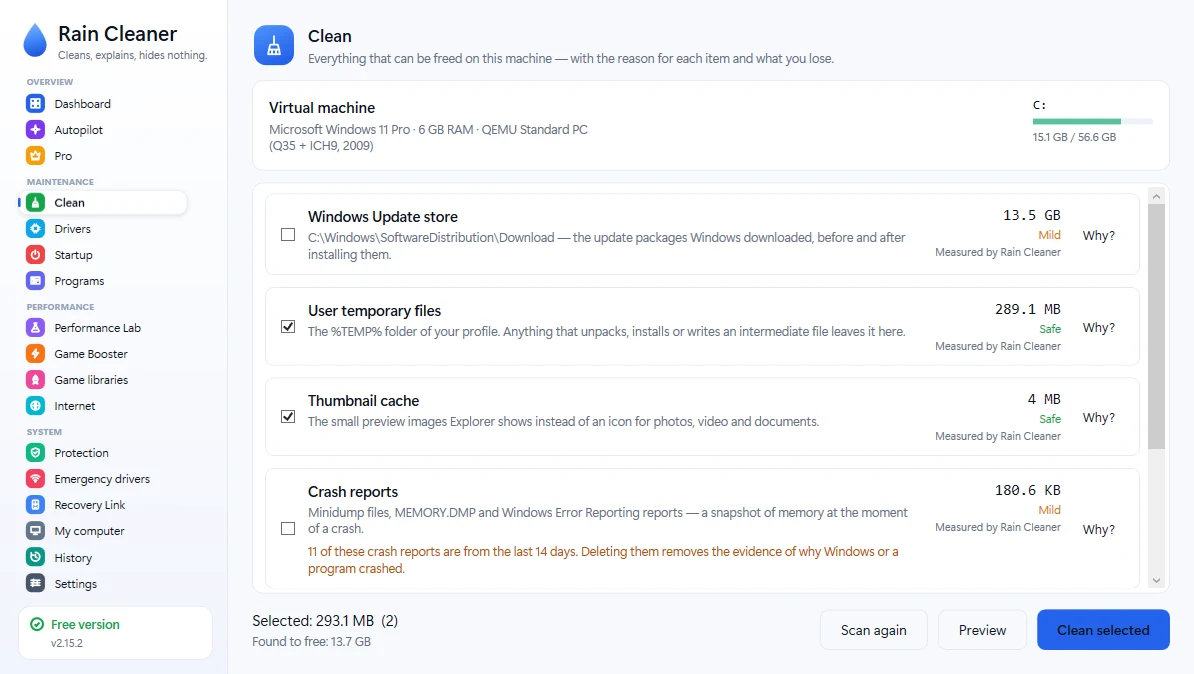
CleaningEvery item with its path, its size and a “Why?” button — plus how safe it is to remove. 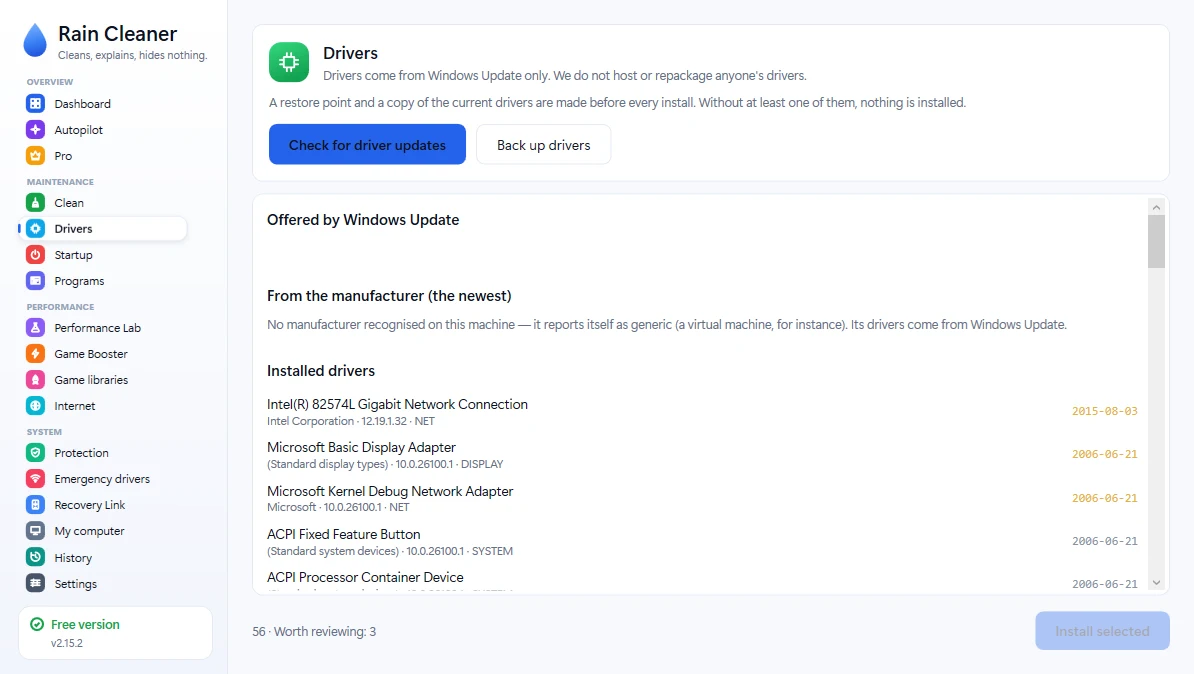
DriversWhat Windows Update offers and what deserves attention. A restore point is made before any install. 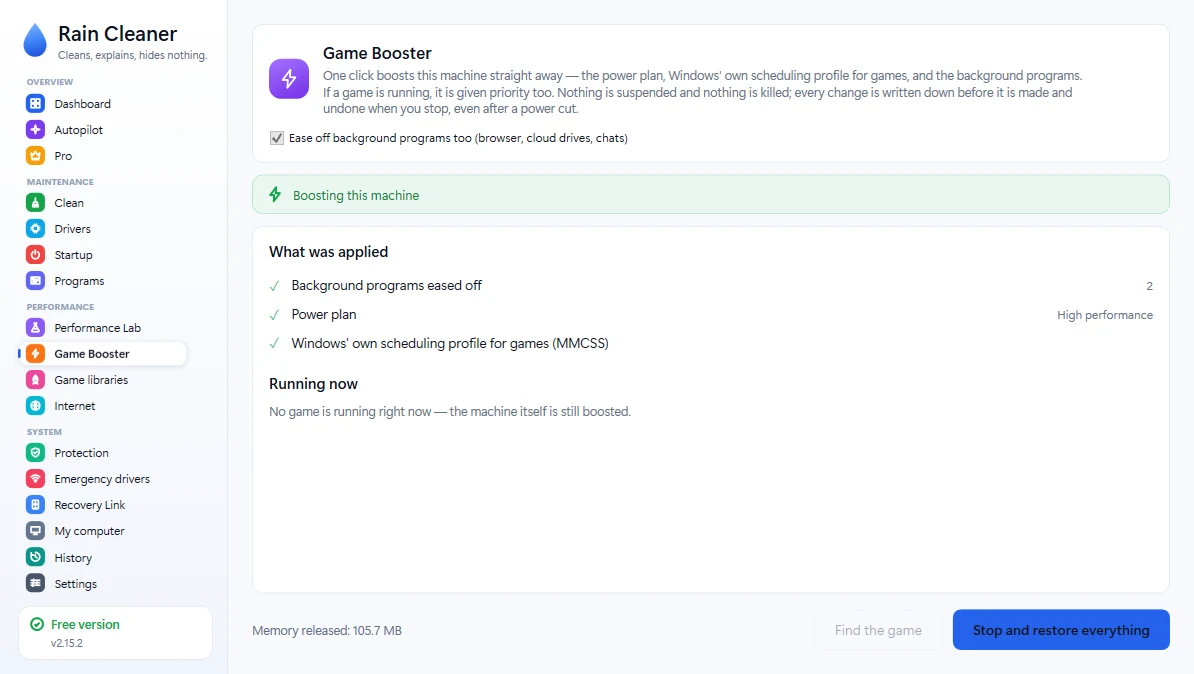
Game boosterWhat a boost changes, before you press it. Every change is written down and put back when you stop. 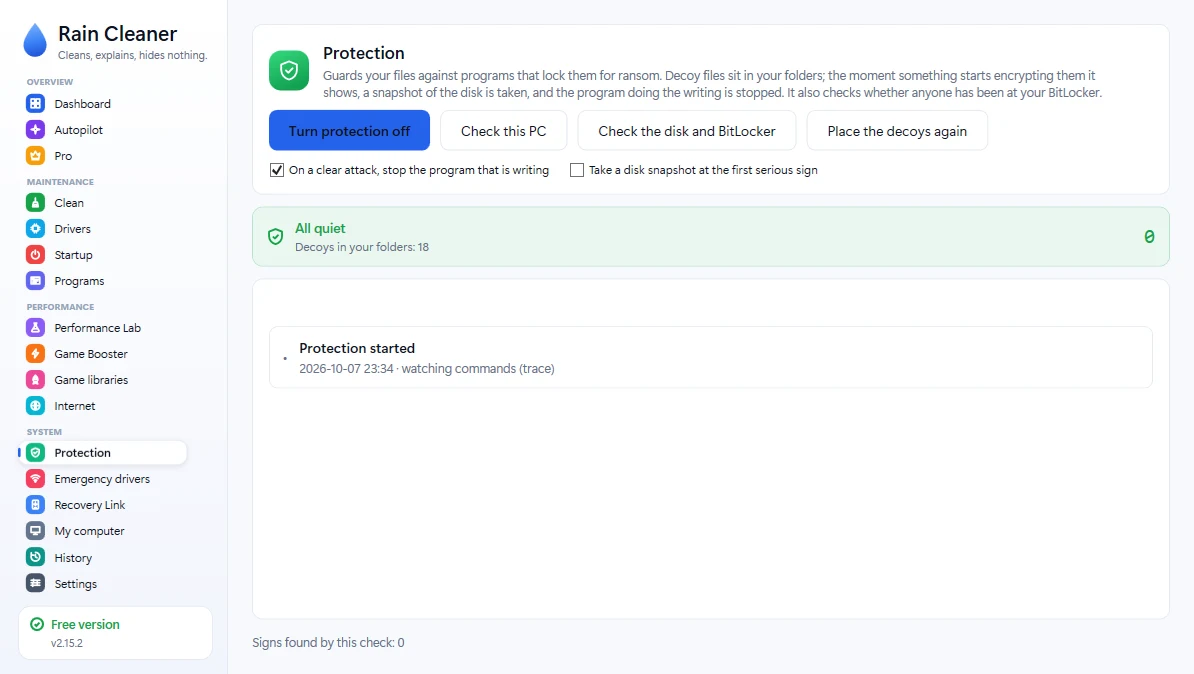
ProtectionDecoy files and a background guard. When nothing is wrong it says so; when something is, it shows what it caught and why. 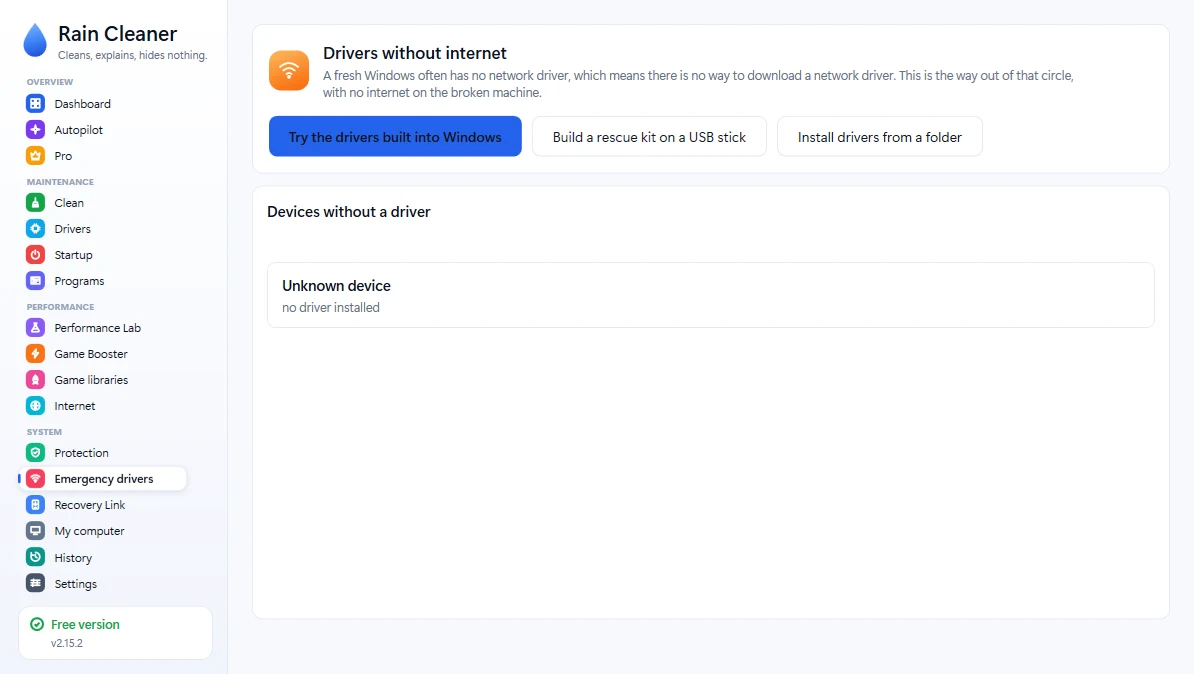
Emergency driversA copy of your network and Wi-Fi drivers, so you still have internet after reinstalling Windows. 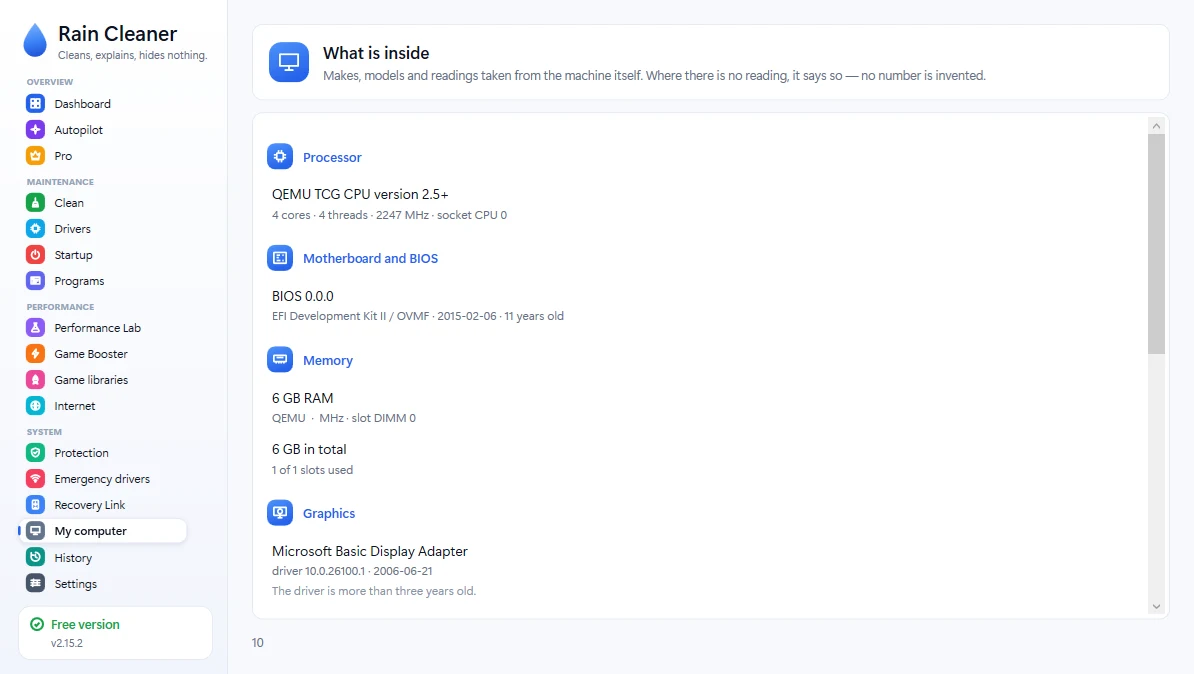
My computerProcessor, memory, disks and free space. Every reading says where it came from; a drive that reports nothing says “no data”. 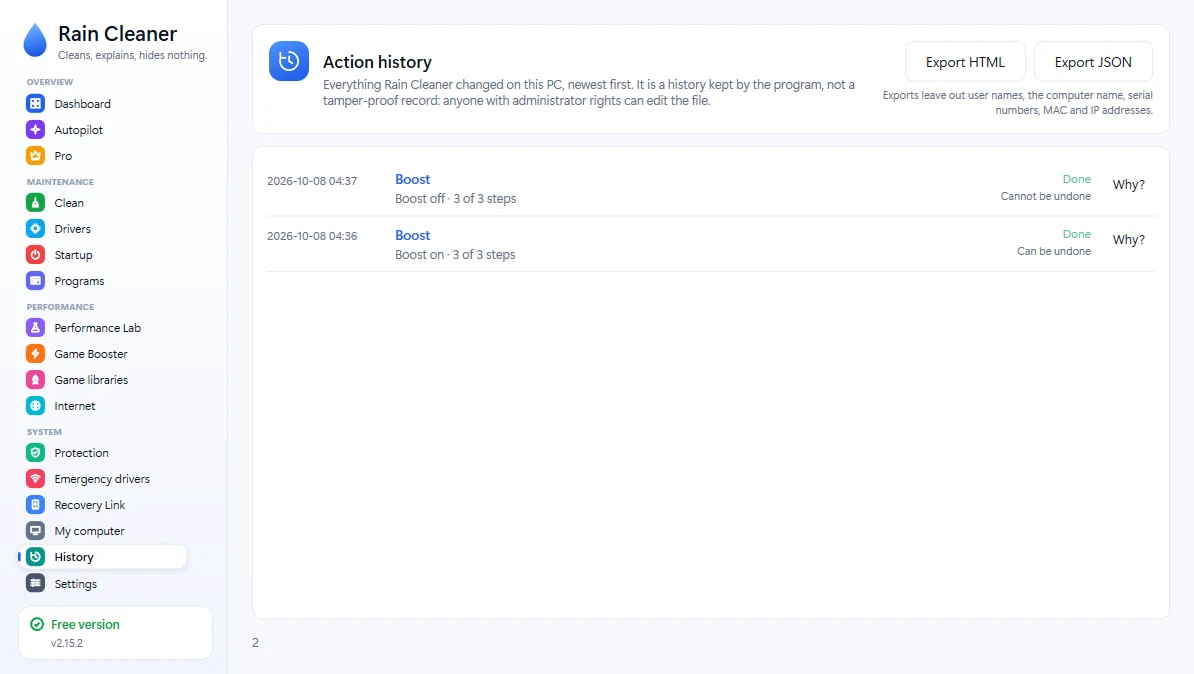
HistoryEverything the program changed, when, and whether it can be undone. Export to HTML or JSON without user names, serial numbers or addresses.
Screenshots from version 2.8.0, taken on a Windows Server virtual machine. The interface speaks 13 languages; shown here in English.
More from Rain
Rain Cleaner for AndroidClean and protect your phone. On Google Play.Rain DriverBack up your drivers before you reinstall Windows.Rain Recovery LinkYour phone can bring Windows back.★ Independently tested by Techno360: 4.3/5 on Windows 11 · Read the review →
Other ways to install
winget install TVasilev.RainCleanerchoco install raincleanerscoop bucket add raincleaner https://github.com/raincleaner/scoop-bucketscoop install raincleaner
Official Scoop bucket. Hashes are verified during installation. Trust Center
What people ask before downloading.
What is Rain Cleaner?
Rain Cleaner is a free cleaner and driver tool for Windows 10 and 11, published by Where2Go LTD. It finds what fills your drive, checks your drivers through Microsoft's update catalogue, frees resources while you play and watches for early signs of ransomware, and it explains every item before you approve a change. Pro (from €5.99 a month) adds automation; the free version has no ads.
Do I need an account?
No. The free version needs no account, no e-mail address and no card. If you buy Pro, you get a licence key by e-mail and enter it in the program; one key works on up to 3 PCs.
Is it really free?
Yes. The free version has no time limit and no ads, and needs no account and no card. Pro is an optional paid upgrade; you never have to buy it.
Do I have to remove my antivirus?
No. Rain Cleaner runs alongside Windows Defender and any other antivirus. It stays out of their way and does not try to do their job.
Can I run it without installing anything?
You can. The portable version unzips into a folder and runs from there. Nothing is left in the system, and deleting the folder removes it.
More questions
Will it delete something I need?
Nothing is deleted until you approve it. The list sits in front of you with a size and a reason on every line, and the checkboxes are yours.
Which Windows does it run on?
Windows 10 and Windows 11, including the server editions. Older versions are not supported.
What languages does it speak?
13 languages: Български, English, Deutsch, Español, Русский, Türkçe, Português (Brasil), 简体中文, 日本語, 한국어, Tiếng Việt, Bahasa Indonesia, ไทย. You can change it in the settings at any time.
Is Rain Cleaner safe?
Nothing is deleted until you approve the list, and every line says what it is and why it can be removed. There is no in-app telemetry and no third-party analytics. The Trust page lists the file hashes, the scan results and every server the program contacts.
Why does Windows SmartScreen warn about Rain Cleaner?
Rain Cleaner is code-signed by Where2Go LTD, but the signature is new and SmartScreen judges files also by how widely they are downloaded. You can use the portable ZIP, and compare the SHA-256 hash on the Trust page with the file you downloaded.
Does Rain Cleaner send my data anywhere?
Your scans, history and settings stay on your PC. It contacts raincleaner.eu for the update check (at most once a day, can be turned off) and for the Pro licence, and Windows Update when you look for drivers. The Trust page lists every server.
Can I undo what Rain Cleaner does?
Driver changes (restore point plus exported drivers), startup entries, DNS and Game Booster changes can be reversed. Deleted temporary files, an emptied Recycle Bin and a removed Windows.old folder cannot be undone, which is why you approve the list first.
Can I back up my drivers before reinstalling Windows?
Yes, with Rain Driver, our separate program for Windows 7 SP1 to 11. Its Driver Passport saves your hardware IDs, driver versions and driver packages with SHA-256 checksums. Backup is free; one-click restore is Pro.