Rain Driver
Back up your Windows drivers before you reinstall.
Create a verified Driver Passport of your current network, storage, graphics and other drivers — then restore them after reinstalling Windows. Rain Driver also finds updates from official sources and explains what Windows reports. It changes nothing without your approval.
Windows 7 SP1 to 11 · 32-bit and 64-bit · No account · Backup is free, one-click restore is Pro
In short: Rain Driver is a Windows program that saves your current drivers in a Driver Passport, checked with SHA-256 checksums, so you can restore them after you reinstall Windows. It runs on Windows 7 SP1 to 11, 32-bit and 64-bit, and needs no account. Backup is free; one-click restore is part of Pro, from €4.99 a month.
Ask Rain AI. Understand Your Drivers.
Describe the problem in plain words and Rain AI turns confusing driver errors into clear, step-by-step guidance in your language. It suggests what to do next — you stay in control.

Ask it things like
Plain words in, clear answers out
Ask about any device or driver problem without needing technical jargon.
Guidance, never silent changes
Rain AI cannot install, remove or change drivers; nothing happens until you click.
Privacy by design
Only a short anonymised summary of hardware and driver facts is sent — never files, logs, names, serial numbers or e-mail.
Built for six languages
Get explanations and step-by-step guidance in any of Rain Driver's 6 supported languages.
Included FREE with Lifetime, or add Rain AI for €4.99/month — cancel any time.
Back up your drivers before you reinstall — in three steps
Scan this PC
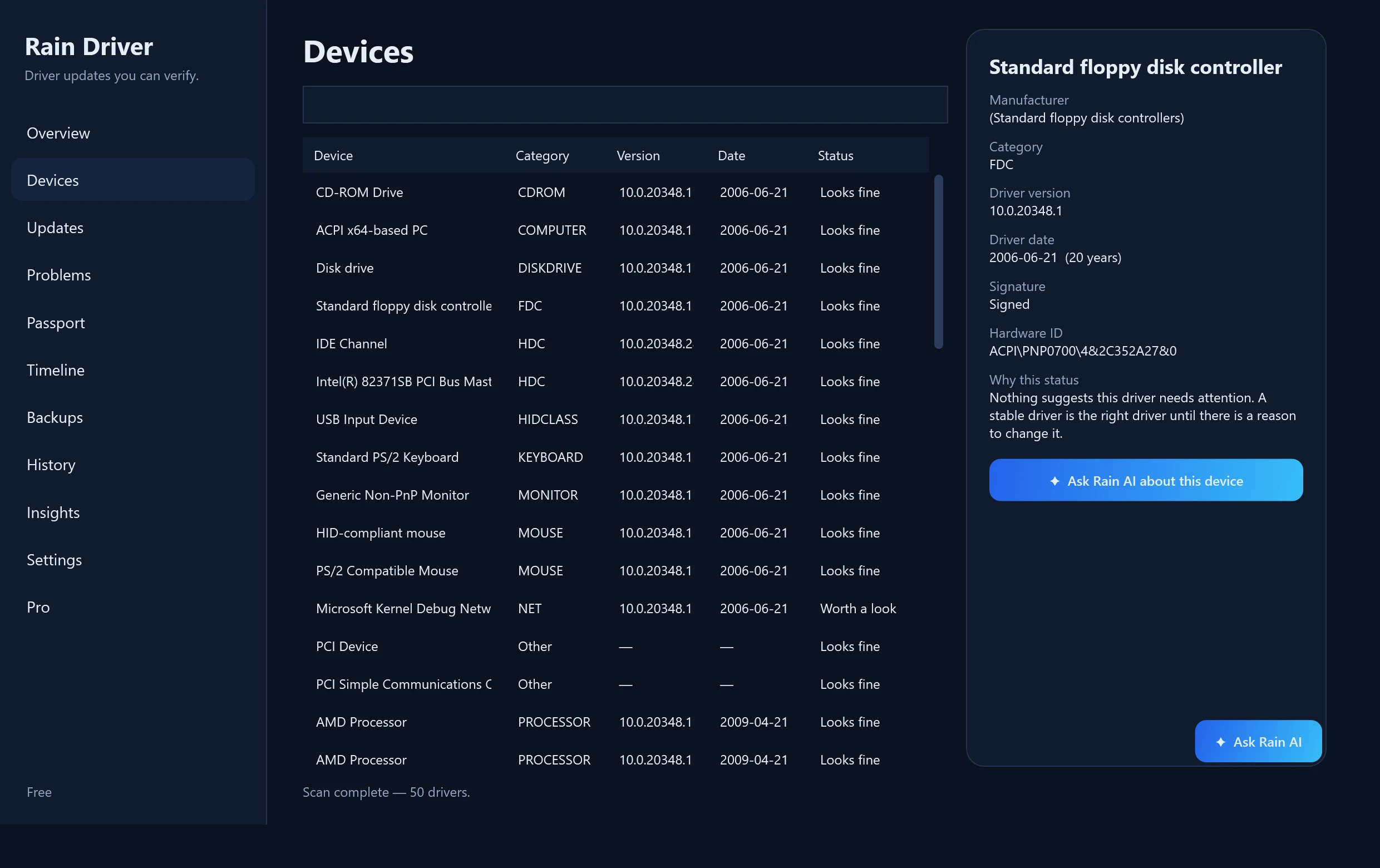
Rain Driver reads which drivers Windows uses — network, storage, graphics, audio and more.
Export and verify
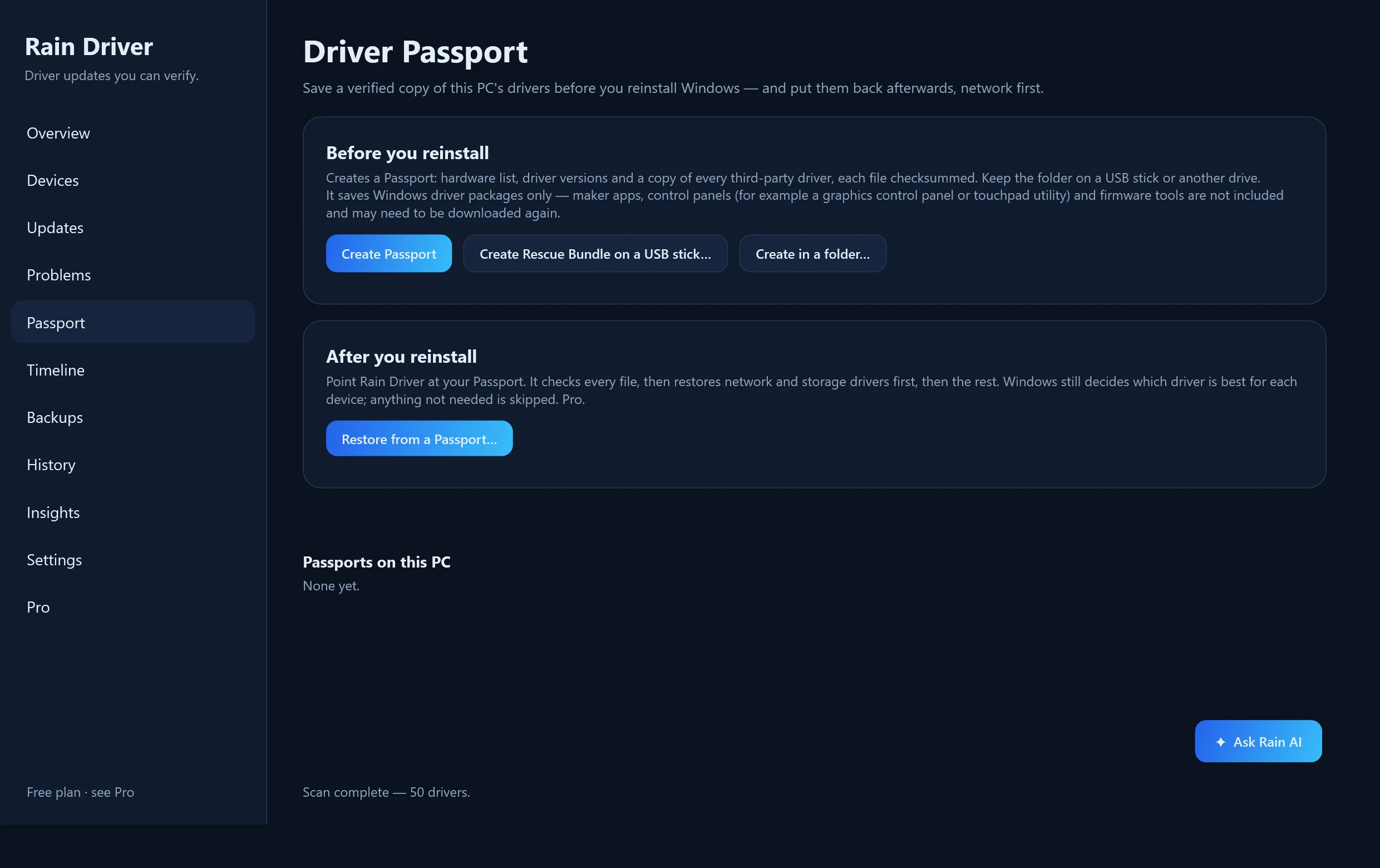
It saves the third-party driver packages Windows can export and writes a SHA-256 checksum for every file. Put it on a USB stick.
Restore after the reinstall
Network and storage drivers come back first. The Rescue Bundle's own script does this for free; Rain Driver Pro does it in one click.
Creating a Passport and a Rescue Bundle is free. A Passport saves Windows driver packages only — maker apps, control panels and firmware tools are not included.
Download
Code-signed by Where2Go LTD. Every file's SHA-256 is listed below so you can verify what you downloaded. Installing drivers needs administrator rights, and Rain Driver creates a restore point first.
Most PCs: Rain Driver installer · Windows 10 / 11
You can use Rain Driver for free
Scan every driver on this PC, create a Driver Passport, build a Rescue Bundle, get Device Manager problems explained and find official manufacturer sources. No account to start. Pro is optional: one-click Passport restore and installing all available updates at once.
Rain Driver installer · Windows 10 / 11
One click: Windows asks for permission, Rain Driver installs, opens and starts scanning.
Version 2.1.0 · 49 MB
Download installerOne-click installer · Signed by Where2Go LTD · No ads · Uninstall from Settings → Apps
Prefer GitHub? Download from GitHub Releases → (same files, same SHA-256)
Verify SHA-256
SHA-256: 42dbe3b47d5aa4b4831a6af0293c3a4f9132e68f0308f94cd04f41bde77c8e4b
Microsoft Defender scan 2026-10-29: no threats found
Before you press Download
- Publisher: Rain Cleaner (developer T. Vasilev) — the same maker as Rain Cleaner.
- It installs with one click (a portable .exe is also offered). Windows asks once for administrator rights, which installing drivers needs.
- Rain Driver never installs a driver by itself: you confirm every change, after a restore point and a copy of your current drivers.
- What leaves your PC: version check, licence activation and, only if you ask, a short Rain AI summary. Details on the Trust page and in Settings → Privacy.
- To uninstall: Settings → Apps → Rain Driver. Your history and driver backups stay in C:\ProgramData\RainDriver until you delete that folder.
- Creating a Passport and a Rescue Bundle is free; restoring with the Rescue Bundle's script is free; one-click restore inside Rain Driver is part of Pro.
- The same files are also published on GitHub Releases (github.com/raincleaner/RainDriver) with identical SHA-256 values.
- Install with Scoop: scoop bucket add raincleaner https://github.com/raincleaner/scoop-bucket, then scoop install raindriver. Hashes are verified during installation.
Older Windows and 32-bit downloads
32-bit Windows 10 installer
Version 2.1.0 · 44 MB
SHA-256: 56c82586f2c86a45238d35a1eb3681e80648d284ff00a665e84e3e8d761d0695
Windows 10 / 11 · 64-bit
Recommended for most current PCs.
Version 2.1.0 · 66 MB
SHA-256: 91bfde559a5b69b14122f7be9a3d6db80b8b6e134b2d59e24d6ab6c763c7a0dc
Windows 10 · 32-bit
For 32-bit Windows 10.
Version 2.1.0 · 60 MB
SHA-256: 499031cbf60e3d8a199cd0e938e11c1ee731156b9217671ef12c01f5cc231f76
Windows 7 SP1 / 8.1 / 10 / 11 · 64-bit
The legacy edition: also runs on older systems.
Version 2.1.0 · 63 MB
SHA-256: c36ba2829b95ed9522a4dc9d31c78c974ab961d3e3b6ca404daf037e0a42db84
Windows 7 SP1 / 8.1 · 32-bit
For 32-bit Windows 7 and 8.1 — most hardware from the 2000s.
Version 2.1.0 · 58 MB
SHA-256: d6041d3831a50a86cbc7dcb7ffbecb4d490e786e2307d73a4f935fb3372ca282
Windows 7 / 8.1 editions: Windows 7 needs Service Pack 1 plus Microsoft's later servicing updates (for example KB4474419, KB4490628 and the Universal C Runtime update KB2999226). Windows XP and Vista are not supported. The Windows 7 / 8.1 edition is new and has been tested on current Windows only, not yet on every older system — please tell us about any problem (support@raincleaner.eu).
Also inside
Included in the free version. These tools read and report. The only thing they can add to your PC is the optional weekly check, and only when you turn it on.
New in 3.0: one tidy list, one click
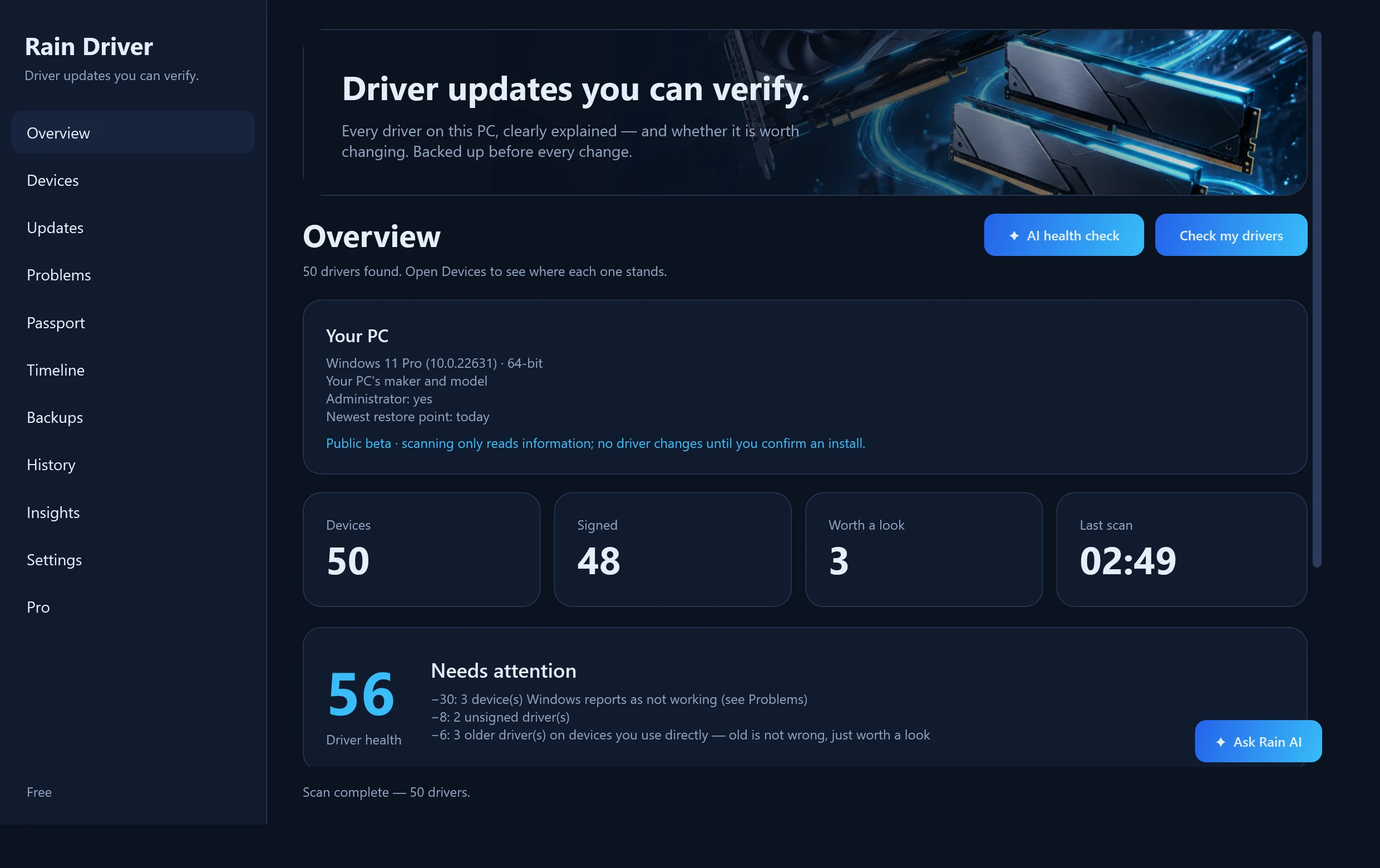
Every outdated driver sits in one list, grouped by graphics, network, sound and the rest, with the version you have, the newer one, how much newer it is and its size. Tick what you want and update it with one button, or skip a version you do not want. Missing game components from Microsoft (Visual C++, DirectX 9) are offered in the same list, and Quick fixes repair lost sound or a broken network with a click.
Old driver cleanup
Every driver update leaves the old version behind. Rain Driver finds the versions a newer copy has replaced and that no device uses, and shows how much space they take. Finding them is free; removing them with one click, after a restore point, is part of Pro.
Driver security check
Rain Driver checks installed kernel drivers against built-in snapshots of Microsoft's recommended vulnerable-driver rules and LOLDrivers, using exact file and Authenticode hashes where supported. A clean result means no match was found in the rules Rain Driver evaluates. It does not prove that every driver is safe.
Compare Driver Passports
Compare two Driver Passports, or a saved Passport with the PC as it is now. Rain Driver shows added or removed devices, driver version and provider changes, and problems that appeared or disappeared.
Modern connectivity health
See what your Wi-Fi adapter and driver report for Wi-Fi generation and WPA3, next to Bluetooth and USB4 / Thunderbolt device health. Where Windows cannot tell, Rain Driver says so instead of guessing.
Technician command line and exports
Export scans, device lists, security checks and Passport comparisons as versioned JSON or CSV for troubleshooting and automation. The reporting commands are read-only: finding a problem or a changed driver does not modify the PC.
Windows Update policy inspector
See which update source this PC uses and which policies affect drivers, then ask that source what it returns for drivers. Rain Driver only reads: it never changes the update source, Group Policy or device-management settings, and an empty answer is not read as "up to date".
Weekly check (optional)
Turn on a local weekly check that tells you only about something new: a device that stopped working, an exact vulnerable-driver match, or a driver whose signature check now fails. It is off by default, runs through Windows Task Scheduler on Windows 10 and later, installs nothing and sends nothing.
Firmware advisor
See the installed BIOS / UEFI version and date, boot mode, Secure Boot and the firmware resources Windows reports, with a link to the maker's official support page. Rain Driver never flashes or downloads firmware and does not call a BIOS outdated because of its age.
Feature-update safeguard check
See whether Windows has recorded a safeguard hold that keeps the next feature update from being offered, with the safeguard ID and reason Windows gives. Rain Driver only reads this local record, says when it may be out of date, and never removes a hold or suggests bypassing one.
Console launcher for scripts
One command writes RainDriver.com next to the program. From cmd or PowerShell it waits for Rain Driver, passes your arguments through unchanged and returns the exact exit code, so scripts and remote-support tools can use it normally.
Ways back, and plain explanations
See which way back Rain Driver can verify for each driver: the version in your Passports, a restore point, the copies from a protected update. Device problems also get short explanations built only from facts read on your PC, with the facts listed. No model, no network.
What it covers
Graphics · Network and Wi-Fi · Bluetooth · Chipset · Storage · Audio · USB · Printers and more
See it working
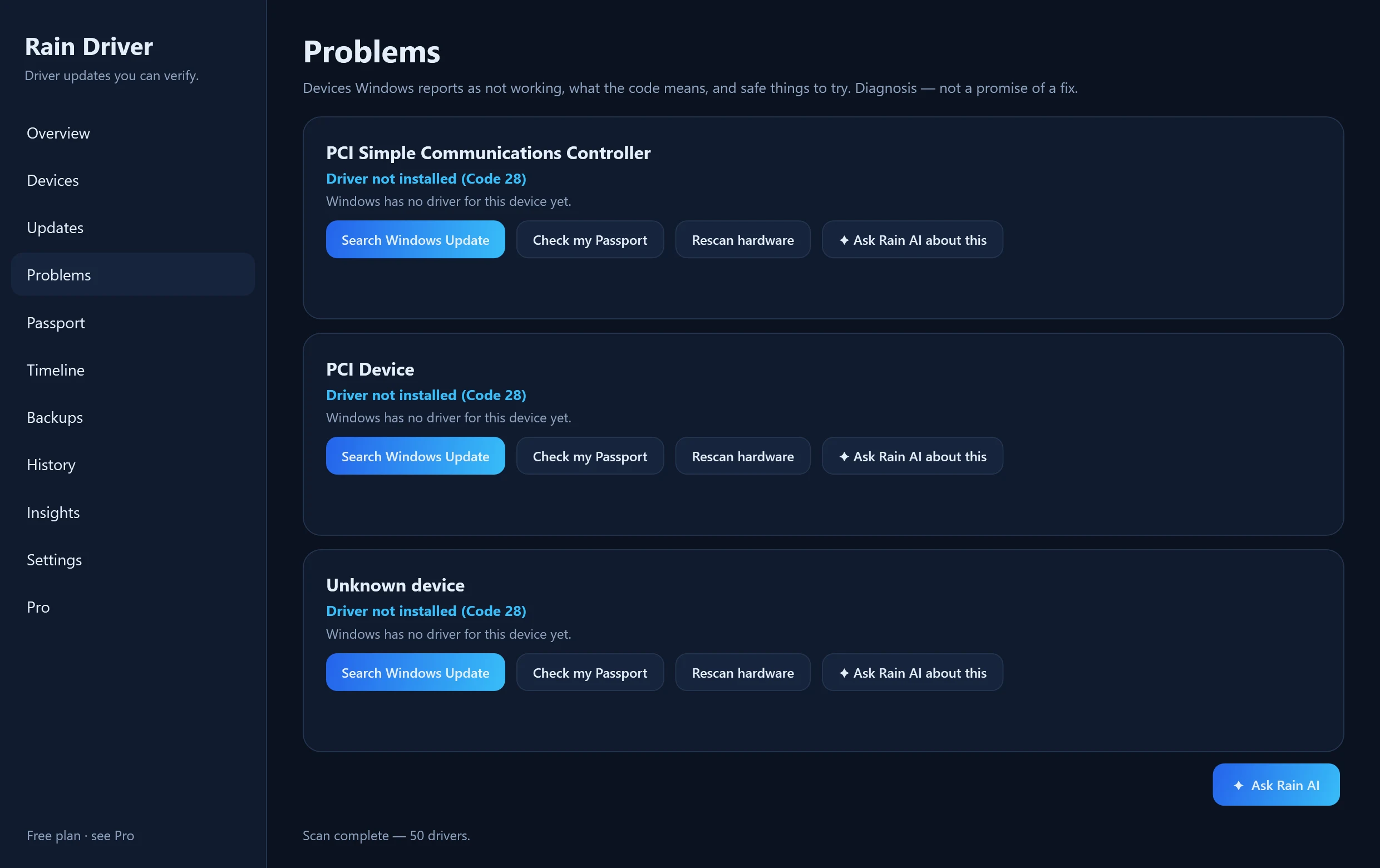
These are real screenshots of the program (English interface).
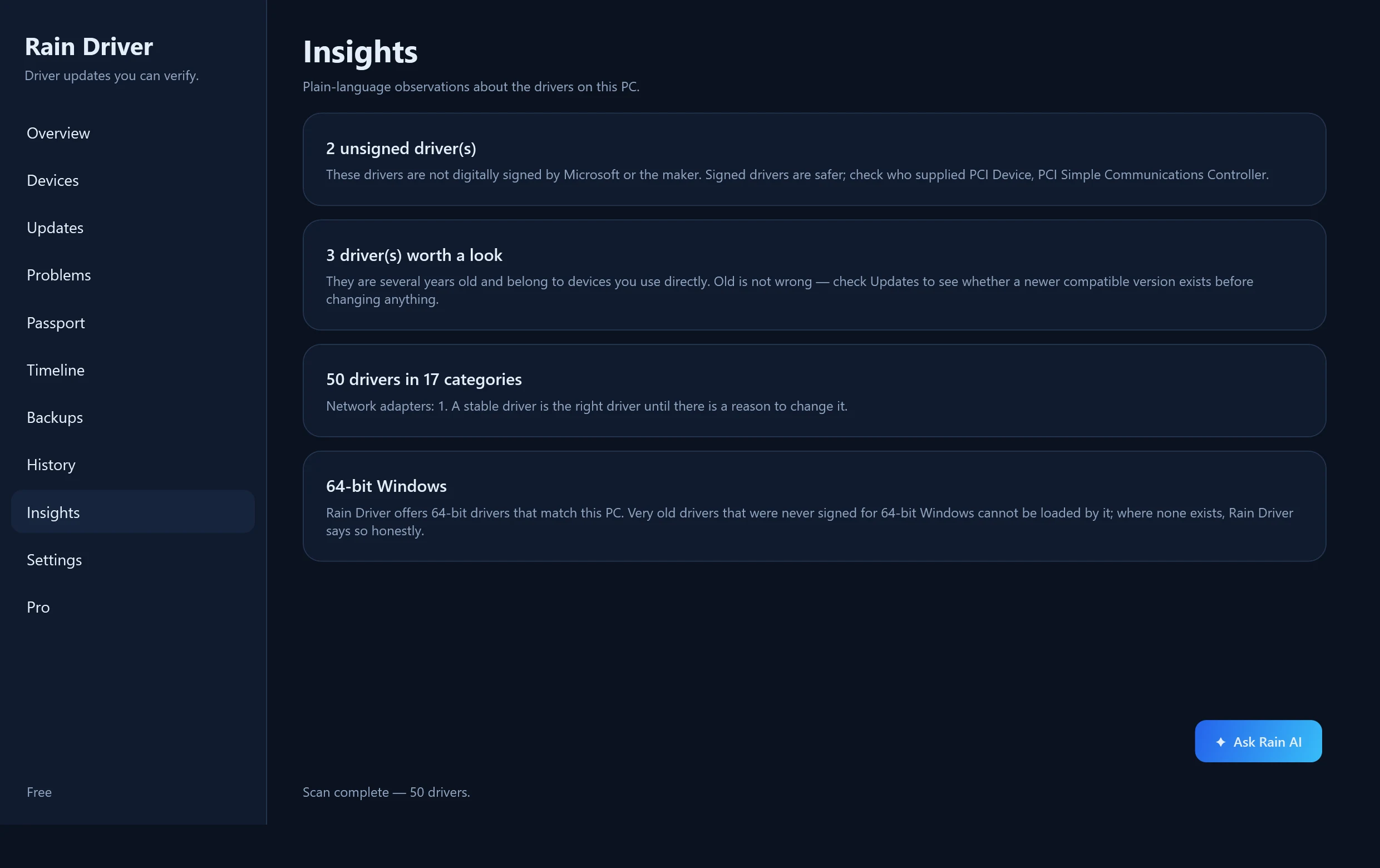
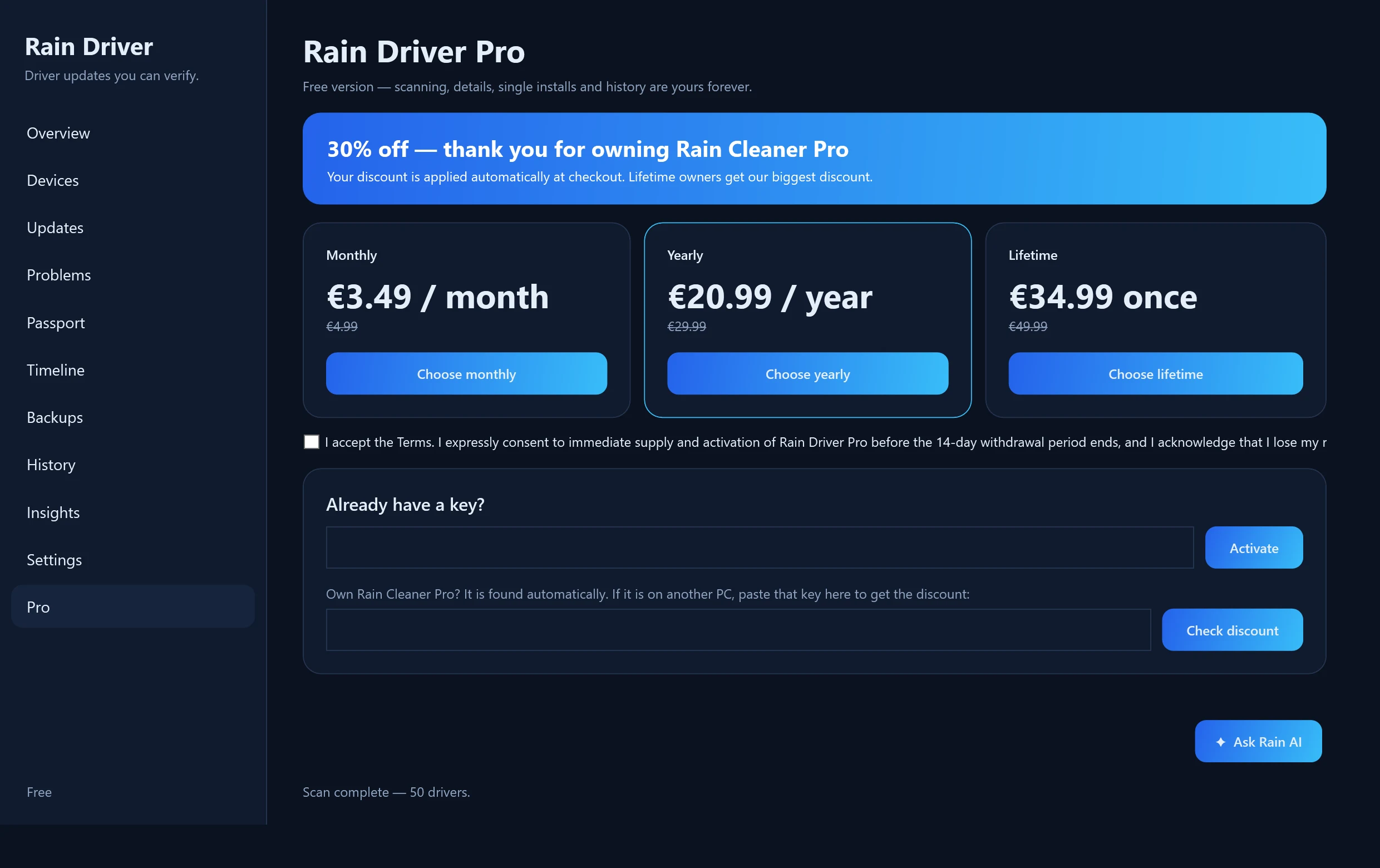
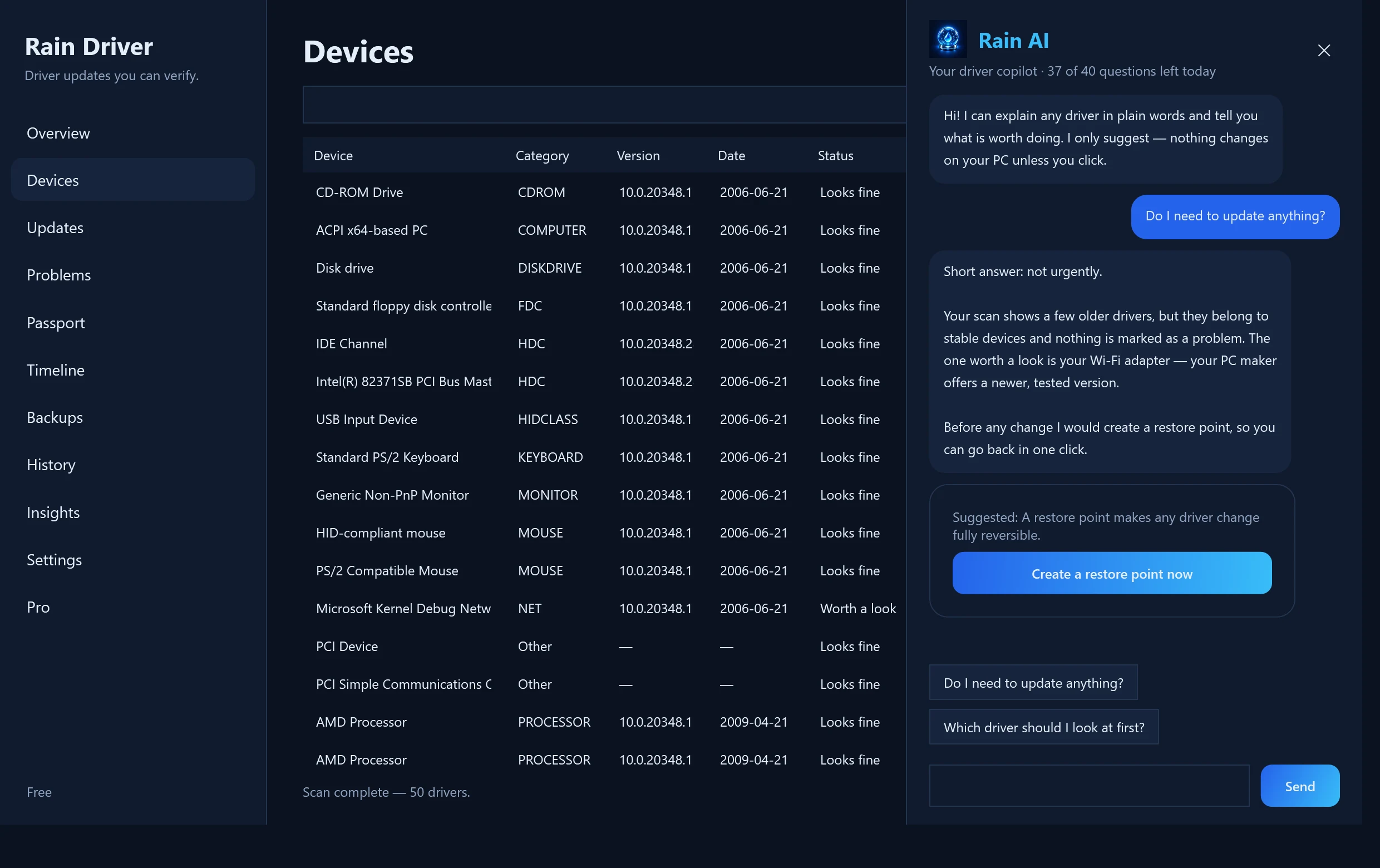
Free is genuinely useful. Pro saves you time.
Free
- Scan every driver on this PC
- Driver Health score and a saved report
- Problem Doctor: Device Manager codes explained
- Timeline of what changed and when
- Driver Passport and Rescue Bundle (backup)
- Official manufacturer packs and download pages, one at a time
- Restore point and driver copy before every change
- A notice when a new version of Rain Driver is out
Pro
- One-click restore from a Driver Passport
- Install all available updates at once
- Rain AI included with Lifetime (optional add-on with Monthly or Yearly)
- Everything in Free
Prices include applicable taxes as shown at checkout. Subscriptions can be cancelled before the next renewal. Lifetime is a one-time licence for Rain Driver, not a guarantee of perpetual support for every future version of Windows. Rain AI is included with Lifetime; with Monthly or Yearly it is a separate add-on (€4.99 per month).
Own Rain Cleaner Pro? Save 20–30%.
Rain Cleaner Pro owners get a discount on Rain Driver Pro, applied automatically: 30% with Lifetime, 25% with Yearly, 20% with Monthly. No code to copy.
Official sources we rely on
Microsoft
- Windows Update Agent API
- Microsoft Update Catalog
- Driver Store
- Driver selection and ranking
- Driver signing options
- PnPUtil
Computer makers
- Dell Driver Pack Catalog
- HP Image Assistant
- HP Client Management Script Library
- Lenovo update catalogs
- ASUS support
- MSI download center
- GIGABYTE download center
- ASRock drivers
- Microsoft Surface drivers
Component makers
- NVIDIA driver search
- AMD support
- Intel download center
- Realtek downloads
- Broadcom support
- Creative support
- Matrox legacy graphics drivers
- VIA drivers
Open identifier databases
Questions
Is it the same as Rain Cleaner?
No. Rain Cleaner looks after the whole PC. Rain Driver is a separate program focused only on drivers.
Does it work on 32-bit Windows?
Yes. There is a 32-bit edition of Rain Driver, and on a 32-bit Windows it finds, downloads and installs the 32-bit drivers that match your PC — which is what most hardware from the 2000s needs. A 32-bit driver cannot be used on 64-bit Windows, so Rain Driver always picks the one that matches your system.
Will it install drivers automatically?
Only when you ask. Every change is preceded by a restore point and a copy of your current driver.
Is this a finished release?
Yes. Rain Driver 1.0 is the first official release and the builds are code-signed. Backup and recovery features are new, so keep a normal backup of important data and tell us about any problem.
Can Rain Driver guarantee it fixes Code 10, 28 or 43?
No. These codes can come from drivers, firmware, configuration or failing hardware. Rain Driver explains the problem and offers safe diagnostic and recovery actions.
Can I back up my drivers before reinstalling Windows?
Yes. Driver Passport saves your hardware IDs, driver versions and driver packages with SHA-256 checksums. Backup is free; one-click restore is Pro. For a fresh offline install, the Rescue Bundle puts the Passport and your network drivers on a USB stick.
Is Rain Driver free?
The backup is free: you can create a Driver Passport and keep it without paying. One-click restore is part of Pro: €4.99 a month, €29.99 a year or €49.99 once.
Do I need an account for Rain Driver?
No. You download it, run it and back up your drivers without an account.
Driver guides
How to update drivers on Windows 11
The safe order — Windows Update, then the manufacturer, never a driver pack.
Do you actually need a driver updater?
Usually not — and the specific cases where the answer changes.
Back up drivers before a Windows reinstall
Export, verify and restore the drivers you actually need.
Device Manager Code 28 explained
What it means and the safe order to fix it.
Device Manager Code 43 causes
Driver, firmware or hardware? A safe way to tell.
Network driver after a Windows reinstall
Get online again when the adapter has no driver.
Roll back a driver update in Windows 11
From Roll Back Driver to restore points.
Drivers for an old 32-bit Windows 7 laptop
A safe search order for legacy hardware.
Identify an unknown device by hardware ID
Read the ID, find the maker, get the official driver.
Update a graphics driver safely
NVIDIA, AMD and Intel: a short safe routine.
Do you need chipset drivers?
What they do and when to install them.
Find a driver by Hardware ID
Read the ID, understand it and search the maker's official page.
Drivers after a clean install of Windows 11
A sensible order for network, chipset, storage, graphics and more.
Install INF drivers with PnPUtil
Add one driver or a whole folder from the command line.