1. Open Clean and read the list
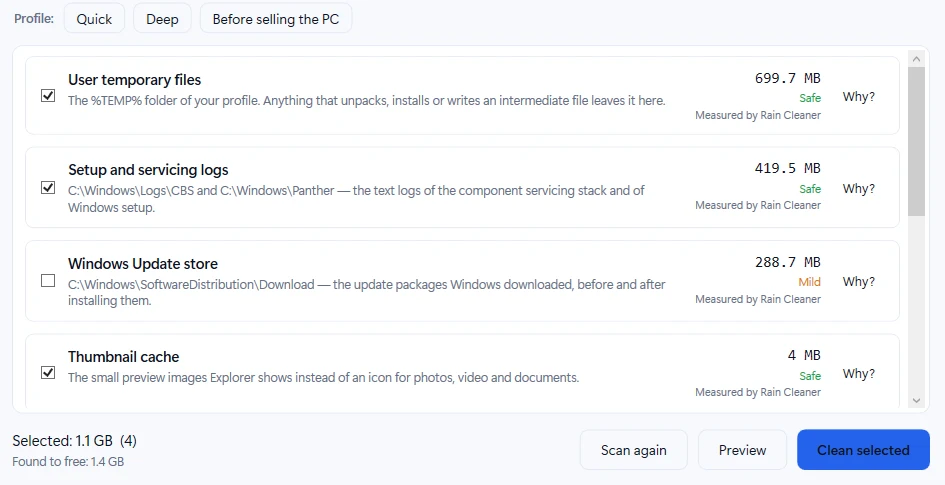
Open Clean in the left menu. Rain Cleaner scans and lists what can be freed. Each row shows what it is, where it is on disk, its size, a risk label and a Why? button that explains what you lose if you remove it.
Risk labels: Safe (Windows recreates it when needed), Mild (something is slower once or you lose a little convenience) and Your call (you could lose something you may want, so it is never ticked for you). Sizes say Measured by Rain Cleaner when the program measured them itself.
2. Pick a profile, or tick items yourself
Profiles only tick items a person could tick by hand, and never anything that is blocked. Quick ticks only the Safe items. Deep also ticks items that cost a little convenience once, for example the browser cache, so sites load slower the first time. Before selling the PC is like Deep and also empties the Recycle Bin, which cannot be undone.
Before you give a PC away, also use Windows itself: Settings → System → Recovery → Reset this PC → Remove everything. A cleaner is not a replacement for that.
3. Preview first
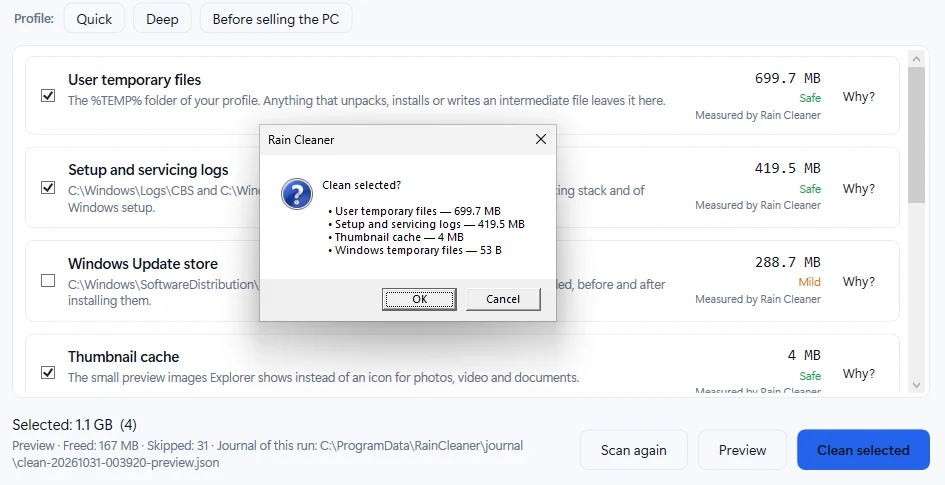
Preview checks what would be cleaned without deleting files and reports the expected result and what would be skipped. On the test PC 1.1 GB was selected, but the preview reported 167 MB that would really be freed and 31 skipped items (all of them junctions or symbolic links, which Rain Cleaner skips on purpose). The freed amount can be much lower than the selection, and the preview shows this before anything is deleted. The preview journal is saved in C:\ProgramData\RainCleaner\journal.
4. Confirm the list
Clean selected opens a confirmation with every selected item and its size. Nothing is deleted until you press OK.
5. Read the result
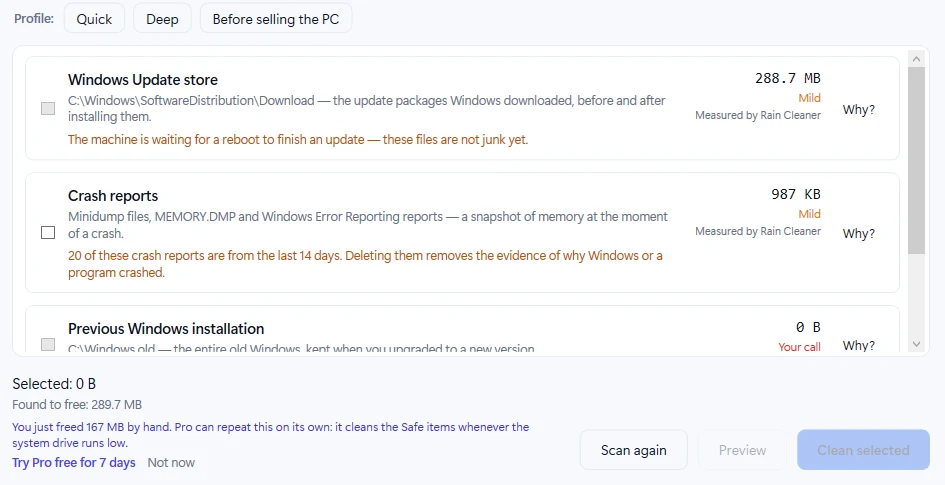
After the cleanup, the list shows what is left. Some rows explain why they are not ticked: on the test PC the Windows Update store was blocked because Windows was waiting for a reboot to finish an update, and the crash reports row warned that 20 reports were from the last 14 days and are the evidence of why something crashed.
Under the list Rain Cleaner says how much was really freed - here 167 MB - and offers Pro once, with a Not now link. Pro can repeat the Safe part on its own when the system drive runs low; you do not need it to clean by hand.
6. Check the history
History lists what Rain Cleaner changed on this PC, newest first, with Export HTML and Export JSON. Exports leave out user names, the computer name, serial numbers, MAC and IP addresses. Deleted files are marked Cannot be undone, and the page says plainly that the history is kept by the program, not a tamper-proof record.
Windows can do much of this too
Settings → System → Storage → Temporary files and Disk Cleanup clean many of the same kinds of files without any extra program. Rain Cleaner brings the explanations, preview, confirmation and history into one place. The free version has no ads; Pro has a free 7-day trial with no card.